
SSH tunnel to MySQL from your iPhone
Your production MySQL listens on 127.0.0.1 or a private subnet. RowDeck reaches it the way your laptop does, through your bastion with your key, and no RowDeck server sits between your iPhone and the database.
A server the phone can’t reach
MySQL on a production host listens on loopback or a private address, and port 3306 stays closed to the internet. Ubuntu’s mysql-server and Debian’s mariadb-server packages ship with bind-address = 127.0.0.1. Check on the server:
SHOW GLOBAL VARIABLES
WHERE Variable_name IN ('bind_address', 'port', 'skip_networking');
With 127.0.0.1, only processes on that host can connect over TCP. A tunnel gets you in: RowDeck signs in to your bastion over SSH and asks it to open a TCP connection to the database host and port you entered, the same forward ssh -L sets up. A tunnel carries TCP, so a server running with skip_networking stays out of reach.
The address MySQL sees through the tunnel
MySQL matches an account by the address a TCP connection comes from. Through a tunnel, that connection starts at the last SSH host in the route.
- MySQL on the bastion itself. Enter
127.0.0.1as the database host. The connection arrives over TCP from127.0.0.1. An account'oncall'@'localhost'matches it while the server resolves host names, because MySQL maps the loopback address tolocalhost. Withskip_name_resolve = ONthat match goes away, and you need'oncall'@'127.0.0.1'. - MySQL on another machine. Enter its address as the bastion sees it, like
10.0.1.20. MySQL sees the bastion’s private address, for example10.0.0.7, so the account is'oncall'@'10.0.0.7'or a subnet such as'oncall'@'10.0.0.%'. With jump hosts, use the address of the last one.
The root@localhost account on Ubuntu’s MySQL (auth_socket) and on MariaDB (unix_socket) signs in by operating-system user over the socket file, and a tunnel arrives over TCP. Create a password account for on-call use:
CREATE USER 'oncall'@'10.0.0.7' IDENTIFIED BY 'use-a-long-random-password';
GRANT PROCESS, REPLICATION CLIENT, REFERENCES ON *.* TO 'oncall'@'10.0.0.7';
GRANT SELECT ON performance_schema.* TO 'oncall'@'10.0.0.7';
GRANT SELECT ON mysql.innodb_index_stats TO 'oncall'@'10.0.0.7';
These are the read-only grants RowDeck’s monitoring asks for. On MariaDB, replace REPLICATION CLIENT with SLAVE MONITOR, BINLOG MONITOR. To test the match, connect from the bastion with the mysql client and run SELECT USER(), CURRENT_USER();. The first value shows the address the server sees, the second the account it matched. A wrong guess shows up in the error text too, as Access denied for user 'oncall'@'10.0.0.7'.
Key, authorized_keys and the host key
Make a key for the phone alone, so you can revoke it without touching anyone else’s access:
ssh-keygen -t ed25519 -C rowdeck -f rowdeck_ed25519On the bastion, add the public half to the account RowDeck signs in as. OpenSSH can limit the key to one forward:
# on the bastion, as that user
echo 'restrict,port-forwarding,permitopen="10.0.1.20:3306" ssh-ed25519 AAAA... rowdeck' >> ~/.ssh/authorized_keys
restrict turns off PTY allocation and agent, X11 and port forwarding; port-forwarding and permitopen give back a single destination.
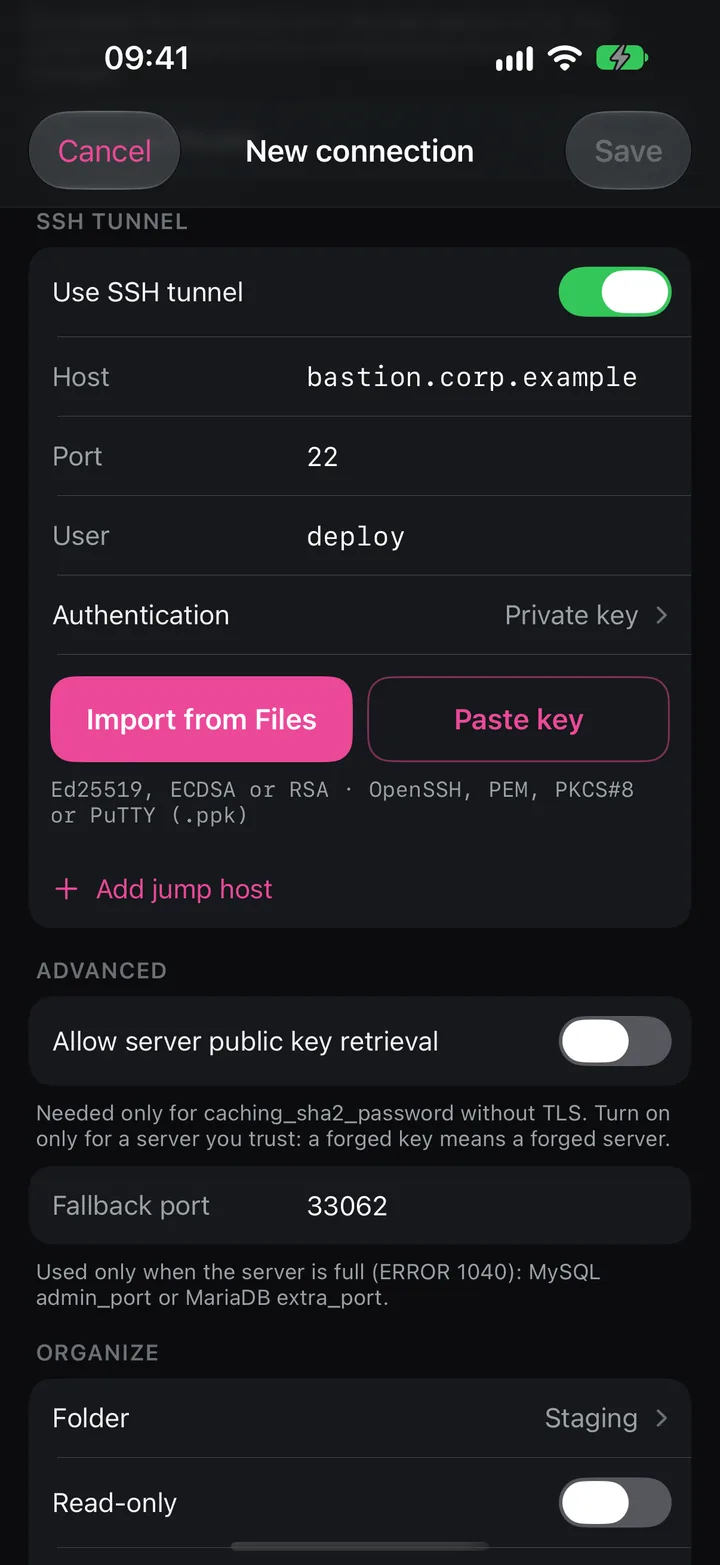
In RowDeck, set Authentication to Private key and use Import from Files or Paste key. RowDeck takes Ed25519, ECDSA or RSA keys in OpenSSH, PEM, PKCS#8 or PuTTY (.ppk) format and keeps the passphrase in the Keychain with the key. A password or a one-time code from the server works too. So does a Secure Enclave key: RowDeck creates it inside the iPhone, it can’t be copied out, and you add its ecdsa-sha2-nistp256 line to authorized_keys the same way.
On the first connect RowDeck shows Verify this bastion with the key type, such as ssh-ed25519 · 256-bit, and the SHA256 fingerprint. Compare it with the bastion’s own output before you tap Trust and remember:
# on the bastion
ssh-keygen -lf /etc/ssh/ssh_host_ed25519_key.pub
# or on a laptop that already trusts the bastion
ssh-keygen -l -F bastion.corp.example
RowDeck pins the key. If it changes later, you see This bastion’s host key changed, with a button to cancel and one to forget the saved key. A changed key gets no one-tap trust.
Jump hosts and TLS inside the tunnel
If the bastion sits behind another host, tap Add jump host. RowDeck connects to the first host from the iPhone and reaches each next host from the one before it, up to three hosts, like ssh -J. Each host has its own sign-in and its own pinned host key, and the last one dials the database host you entered.
SSH encrypts the path from the phone to the last host. From there to MySQL the protocol travels as it is, so keep TLS on when the database runs on another machine. RowDeck’s default TLS mode, REQUIRED, encrypts the session and pins the SHA-256 fingerprint of the server certificate on first connect. MySQL 8.0 generates a self-signed server-cert.pem in its data directory when you configure none, and you can compare its fingerprint:
openssl x509 -in /var/lib/mysql/server-cert.pem -noout -fingerprint -sha256VERIFY_CA and VERIFY_IDENTITY check the chain against a CA you select, and VERIFY_IDENTITY also wants the certificate to name the host you entered. If MySQL runs on the bastion without a certificate, PREFERRED connects without TLS, the unencrypted hop stays on the bastion, and Health shows This session isn’t encrypted.
Test connection walks the route one step at a time: each SSH hop, then TLS and the sign-in. It ends with the server version, its role and the round trip in milliseconds, or stops at the step that failed.
Free and Pro
SSH tunnels, jump hosts and pinned TLS are part of Free, along with the monitoring screens for one saved connection. Pro, a one-time purchase, adds unlimited connections and the actions: kills, writes and the AI assistant.
Keeping access tidy
- Give each phone its own key. If you lose or replace the iPhone, delete its line from
authorized_keys, and nobody else loses access. A Secure Enclave key never moves with a backup, so a restored iPhone needs a new key and a new line. - Narrow the MySQL account’s host part to the bastion’s address instead of
'%'. - After you rebuild the bastion or rotate its host keys, expect the changed-key warning and check the new fingerprint the same way.