
Find blocking queries in MySQL from your iPhone
Requests fail with ERROR 1205 and one thread sits at the root of the pile. RowDeck draws the InnoDB lock tree, puts that thread on top and tells you how many sessions its kill would free.
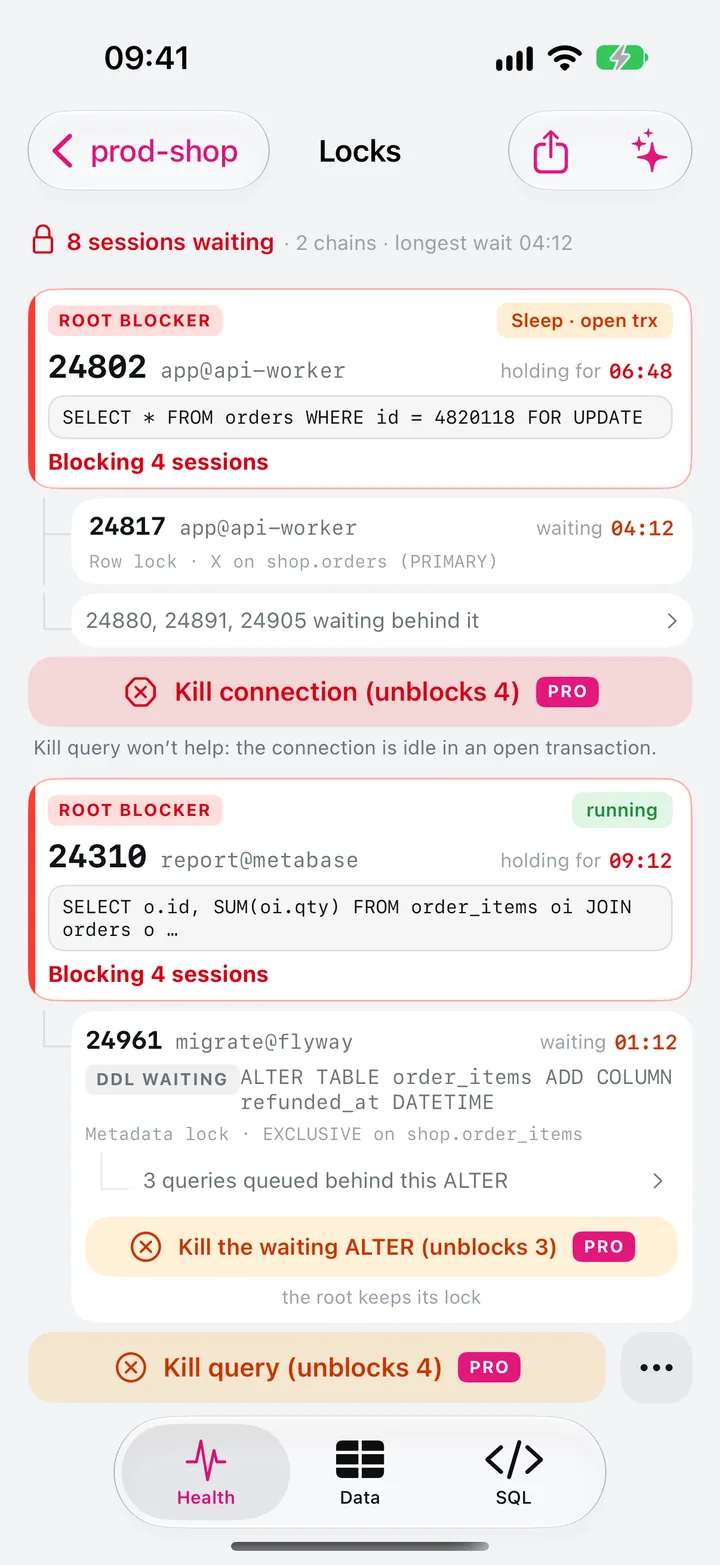
ERROR 1205 and the pile behind it
The application log fills with ERROR 1205 (HY000): Lock wait timeout exceeded; try restarting transaction. Each of those statements waited innodb_lock_wait_timeout seconds for an InnoDB row lock, 50 by default, and gave up. InnoDB rolls back only the statement that timed out unless you turned on innodb_rollback_on_timeout, so the caller’s transaction stays open and its retry joins the queue again.
The thread at the root often looks idle. A worker ran SELECT ... FOR UPDATE or an UPDATE, then waited on an HTTP call or died in a retry loop and never sent COMMIT. In the processlist it shows Sleep with an empty Info, and it keeps its locks until the transaction ends.
Find the blocker by hand
On MySQL 8.0 and later, the sys schema joins the lock tables for you:
SELECT wait_age, locked_table, locked_index, locked_type,
       waiting_pid, waiting_query,
       blocking_pid, blocking_query, blocking_trx_age,
       sql_kill_blocking_connection
FROM sys.innodb_lock_waits
ORDER BY wait_age_secs DESC;
A NULL in blocking_query means the blocker runs nothing: it sleeps inside an open transaction. Under the view sit performance_schema.data_locks and data_lock_waits, which replaced INFORMATION_SCHEMA.INNODB_LOCKS and INNODB_LOCK_WAITS in MySQL 8.0. Their thread columns hold Performance Schema thread IDs, so you map them to processlist IDs through performance_schema.threads:
SELECT rt.PROCESSLIST_ID      AS waiting_id,
       bt.PROCESSLIST_ID      AS blocking_id,
       bt.PROCESSLIST_COMMAND AS blocking_command,
       bt.PROCESSLIST_TIME    AS blocking_time_s
FROM performance_schema.data_lock_waits w
JOIN performance_schema.threads rt ON rt.THREAD_ID = w.REQUESTING_THREAD_ID
JOIN performance_schema.threads bt ON bt.THREAD_ID = w.BLOCKING_THREAD_ID;
MariaDB has no data_locks tables. It keeps the older INFORMATION_SCHEMA views, and you join them to INNODB_TRX:
SELECT r.trx_mysql_thread_id AS waiting_id,
       r.trx_query           AS waiting_query,
       TIMESTAMPDIFF(SECOND, r.trx_wait_started, NOW()) AS waiting_s,
       b.trx_mysql_thread_id AS blocking_id,
       b.trx_query           AS blocking_query,
       TIMESTAMPDIFF(SECOND, b.trx_started, NOW())      AS blocking_trx_s
FROM information_schema.INNODB_LOCK_WAITS w
JOIN information_schema.INNODB_TRX r ON r.trx_id = w.requesting_trx_id
JOIN information_schema.INNODB_TRX b ON b.trx_id = w.blocking_trx_id;
INNODB_TRX and the MariaDB lock views need the PROCESS privilege. Without it, MariaDB shows your account no lock waits at all.
Pick the thread to kill
A thread can hold one lock while it waits for another, so chains run several levels deep. You want the root, the blocker that waits for nothing:
SELECT DISTINCT blocking_pid
FROM sys.innodb_lock_waits
WHERE blocking_pid NOT IN (SELECT waiting_pid FROM sys.innodb_lock_waits
                           WHERE waiting_pid IS NOT NULL);
Killing a waiter in the middle frees only the threads queued behind it, and the root keeps its lock. Once you have the root, its state picks the kill. A root in Sleep with an open transaction needs KILL CONNECTION, because KILL QUERY has no statement to stop. A root running a single statement in autocommit needs only KILL QUERY. The kill guide covers the other cases, rollbacks included.
Check the lock mode too. A LOCK_MODE in data_locks that contains GAP or INSERT_INTENTION points to a range lock: under REPEATABLE READ, an UPDATE or locking read that scans a range also locks the gaps between rows, and inserts into that range wait.
A cycle is a deadlock. InnoDB detects it, rolls back one transaction with ERROR 1213 and leaves you nothing to kill. SHOW ENGINE INNODB STATUS keeps only the latest deadlock, and innodb_print_all_deadlocks writes each one to the error log. Metadata locks, the kind an ALTER TABLE waits for, don’t appear in any of these views: see Waiting for table metadata lock.
The Locks screen
Locks puts InnoDB row locks and metadata locks into one tree and reads it again every 5 seconds while it is open. A summary line such as 8 sessions waiting · 2 chains · longest wait 04:12 sits on top. Each chain starts with a ROOT BLOCKER card: thread ID, user@program, a state pill such as Sleep · open trx, how long it has held the lock, its statement and Blocking 4 sessions. Under it, each waiter shows what it waits for, as in Row lock · X on shop.orders (PRIMARY), and for how long.
The kill button carries a count: Kill connection (unblocks 4). RowDeck counts only the waiters that will get their lock and lists the ones that may stay blocked by another holder. If it can’t read the whole graph, it leaves the number out. After the kill it reads the tree again and tells you whether anything still waits.
The Blocked tile on Health reads the same tree. It turns amber with one waiter, and red with three, with a chain three deep or with a queue behind a waiting ALTER. The Deadlocks tile opens the last deadlock InnoDB recorded: who waited for what, and whose transaction InnoDB rolled back.
Free and Pro
The lock tree, the unblock counts and the last deadlock are free for one saved connection. Killing the root, from the tree or from Activity, needs RowDeck Pro, a one-time purchase. Pro also adds Explain this chain, an assistant on your own AI model that reads a redacted copy of the tree and runs nothing itself. Both work on the built-in demo for free, with sample data and no server.
Keep the locks short
- Commit before the application calls anything outside the database.
- Index the columns in the
WHEREclause ofUPDATEandDELETE. InnoDB locks each index record it scans, so a statement without a usable index locks rows it doesn’t change. - Give request traffic a short wait with
SET SESSION innodb_lock_wait_timeout = 5;and let the client retry. - For queue tables,
SELECT ... FOR UPDATE SKIP LOCKEDorNOWAIT(MySQL 8.0, MariaDB 10.6) skips the wait. - Watch sleeping connections that hold transactions: the processlist guide has the query, and KILL QUERY on a sleeping transaction shows why the gentle kill fails there.