
Kill a stuck MySQL query from your iPhone
One thread holds a lock, the queue behind it grows, and your laptop is at home. RowDeck shows what that thread is doing, offers the kill that frees the queue and counts the sessions it releases.
One statement, two scopes
The page says checkout is timing out. SHOW PROCESSLIST scrolls past a hundred threads, and one of them started the pile. MySQL stops a thread with KILL, and the keyword after it decides how much you stop:
KILL QUERY 24802;       -- end the running statement, keep the connection
KILL CONNECTION 24802;  -- close the connection, roll back its transaction
KILL 24802;             -- the same as KILL CONNECTION
KILL QUERY ends the statement the thread is running. The client receives ERROR 1317 (70100): Query execution was interrupted, and the connection stays open along with any transaction it started. Locks that earlier statements of that transaction took stay where they are.
KILL CONNECTION closes the session. InnoDB rolls back the open transaction, and the server releases its row locks and metadata locks. The application finds out on its next statement, as a lost connection.
MariaDB accepts both forms and adds two of its own: KILL QUERY ID 7731 targets a statement by its query ID, and KILL USER 'report' ends the connections of one account.
Find the thread and check your rights
Start with the threads that hold transactions, oldest first:
SELECT p.ID, p.USER, p.HOST, p.COMMAND, p.TIME, p.STATE,
       LEFT(p.INFO, 60) AS query,
       t.trx_started, t.trx_rows_locked, t.trx_rows_modified
FROM information_schema.PROCESSLIST p
LEFT JOIN information_schema.INNODB_TRX t ON t.trx_mysql_thread_id = p.ID
WHERE p.ID <> CONNECTION_ID()
ORDER BY t.trx_started IS NULL, t.trx_started, p.TIME DESC;
On MySQL 8.0 and later, sys.innodb_lock_waits names the thread at the head of a row-lock wait and writes the kill for you in sql_kill_blocking_query and sql_kill_blocking_connection. The guide to finding blocking queries has the MariaDB version of that query.
You can kill your own threads with no extra privilege. Threads of other accounts need CONNECTION_ADMIN on MySQL 8.0 or CONNECTION ADMIN on MariaDB 10.5, and the older SUPER works on both. Without it the server answers ERROR 1095 (HY000): You are not owner of thread 24802. MySQL 8.0.16 and later also protect sessions of accounts that hold SYSTEM_USER: you need SYSTEM_USER yourself to kill them.
Managed services keep SUPER to themselves. Amazon RDS for MySQL and Aurora MySQL give you stored procedures for the job, and Azure Database for MySQL has its own pair:
CALL mysql.rds_kill_query(24802);  -- Amazon RDS, Aurora MySQL
CALL mysql.rds_kill(24802);
CALL mysql.az_kill_query(24802);   -- Azure Database for MySQL
CALL mysql.az_kill(24802);
Query or connection: read the thread first
Queryin autocommit. The statement is the whole transaction.KILL QUERYstops it, rolls back its changes and leaves the connection to the pool.Sleepwith a row inINNODB_TRX. The thread runs nothing, soKILL QUERYhas nothing to stop and the locks stay.KILL CONNECTIONrolls the transaction back and frees them. On MariaDB,KILL QUERYon such a thread marks itKilledand leaves the transaction open for as long as the connection lives.- A statement inside an explicit transaction.
KILL QUERYends the statement, and the transaction keeps the locks from its earlier statements. If other threads wait on those locks, you needKILL CONNECTION. Killedalready, withtrx_state = 'ROLLING BACK'. Wait it out. Undoing a transaction that changed millions of rows can take longer than the changes took, and a restart ofmysqlddoesn’t skip it: InnoDB finishes the rollback after crash recovery. Watch the count fall:
SELECT trx_mysql_thread_id, trx_state, trx_rows_modified
FROM information_schema.INNODB_TRX
WHERE trx_state = 'ROLLING BACK';
A backup taken with mysqldump --single-transaction looks like any other old transaction in that list. Killing it ends the backup.
The kill sheet in RowDeck
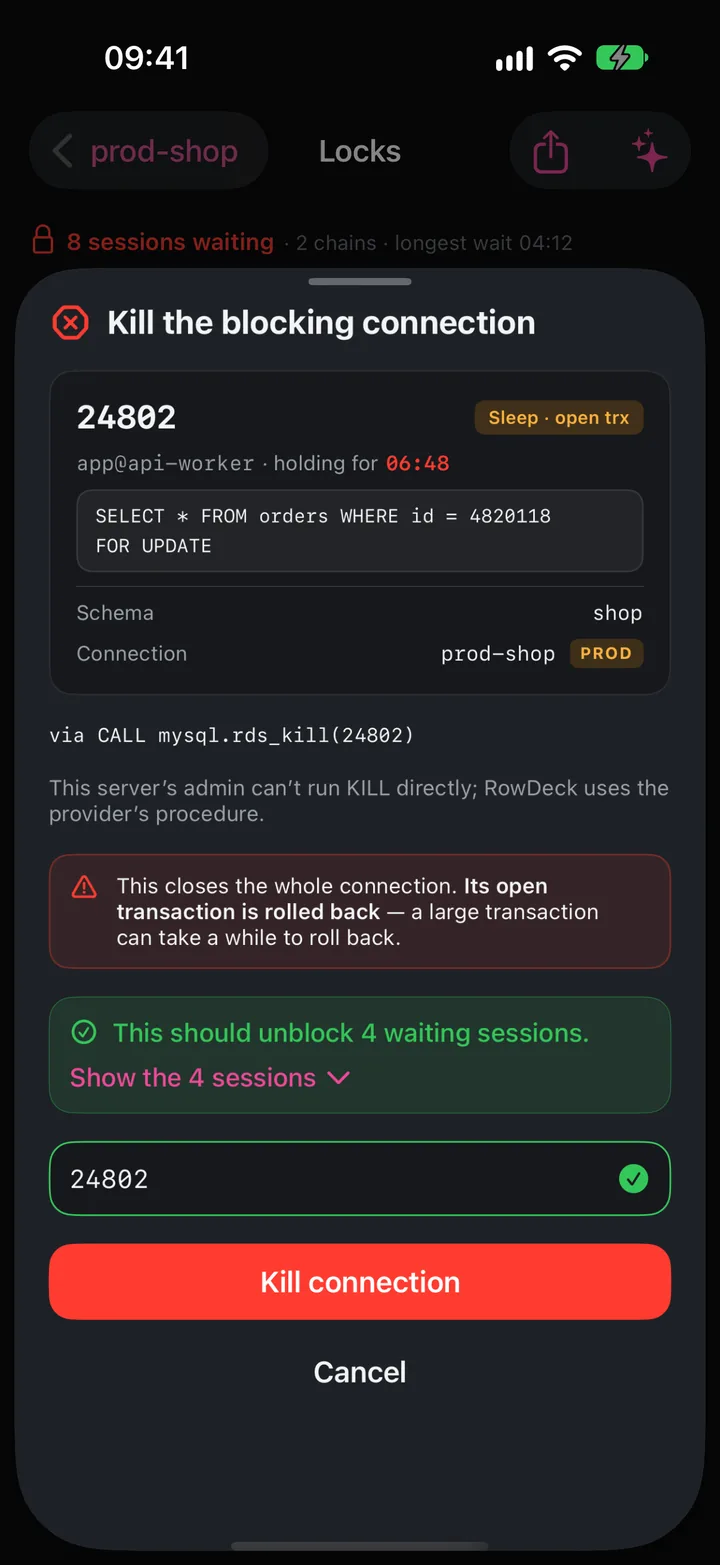
Locks and Activity show each thread’s command and transaction state, and RowDeck picks the main action from them. For root blocker 24802, asleep in an open transaction for 06:48, the button reads Kill connection (unblocks 4), with the note Kill query won’t help: the connection is idle in an open transaction. For a statement running in autocommit, the main button is Kill query. In Activity, you can swipe a row for either one.
The confirmation names the thread, user@program, its statement, the schema and the connection, with a PROD badge on a connection you marked Production. It warns that the open transaction rolls back and says how many waiting sessions the kill should free. On a Production connection, you type the thread ID before RowDeck kills a connection. A connection you marked Read-only blocks kills too, Pro included.
On RDS and Aurora the sheet reads via CALL mysql.rds_kill(24802). Behind a proxy, RowDeck sends no kill, since the thread ID there may belong to another server, and gives you the statement to run on the server itself. If the thread ends before the kill arrives, you see This thread has already finished with the server’s ERROR 1094. After a kill, RowDeck reads the lock tree again and shows Killed · 4 sessions unblocked, or the sessions that still wait on another lock.
Free and Pro
Activity, Locks and the other monitoring screens are free for one saved connection. Killing a query or a connection, including the root of a chain and a waiting ALTER, is part of RowDeck Pro, a one-time purchase that also adds unlimited connections. On Free the kill buttons open the Pro offer. You can run the kills on sample data first: tap Explore demo data on the Connections screen, no server or account needed.
Keep the next one from piling up
max_execution_time(MySQL, in milliseconds) caps read-onlySELECTstatements, and theMAX_EXECUTION_TIME(n)optimizer hint sets it for one query.max_statement_time(MariaDB, in seconds) caps statements of any type.- MariaDB 10.3 and later end idle transactions with
idle_transaction_timeout,idle_readonly_transaction_timeoutandidle_write_transaction_timeout. Stock MySQL 8.0 and 8.4 have no such setting, and Percona Server for MySQL addskill_idle_transaction. wait_timeoutcloses idle connections after 28800 seconds by default, and a busy connection pool reuses each connection long before that.- Commit before the application calls another service. A transaction left open across an HTTP call is the classic sleeping blocker, and why KILL QUERY can’t free it walks through one.
If the stuck thread is an ALTER TABLE, read the metadata lock guide before you kill anything.
Amazon Web Services, AWS, Amazon RDS and Amazon Aurora are trademarks of Amazon.com, Inc. or its affiliates. Microsoft Azure is a trademark of the Microsoft group of companies. RowDeck is not affiliated with or endorsed by any of them.