
MySQL replication lag and a stopped replica
Seconds_Behind_Source turns NULL when the replica stops applying, and it can read 0 while the replica falls behind. RowDeck shows both replication threads, the lag, the transactions still to apply and the error that stopped the channel.
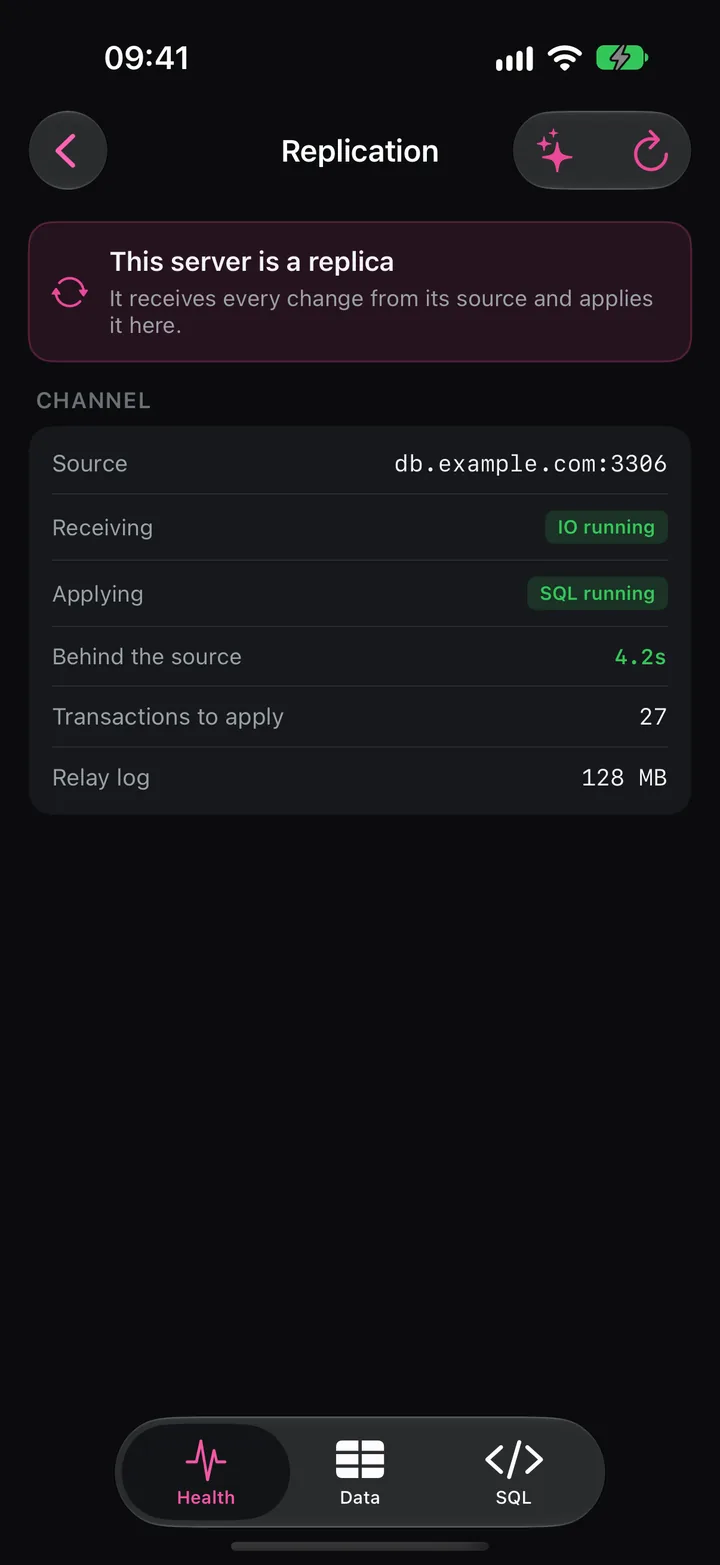
Lag, NULL and a stopped thread
You got paged for replication lag, or reads from a replica return old data. A replica runs two threads per channel. The IO thread, or receiver, copies the source’s binary log into the local relay log, and the SQL thread, or applier, executes it. Seconds_Behind_Source compares the replica’s clock with the original timestamp of the event the applier is running, corrected for the clock difference between the servers.
NULL: the SQL thread isn’t running, or it has applied the whole relay log while the IO thread is down. Treat it as a replica outage.0: the applier has nothing left in the relay log. If the IO thread falls behind on a slow network, the replica can trail the source by minutes and still report 0.- A jump from 0 to minutes: one large transaction, often a big
DELETEor anALTER. The replica starts it after the source commits it and needs about as long to apply it.
Reading the status by hand
SHOW REPLICA STATUS\G   -- MySQL 8.0.22 and later, MariaDB 10.5.1 and later
SHOW SLAVE STATUS\G     -- MySQL before 8.0.22
On MySQL, read Replica_IO_Running (Yes, No or Connecting), Replica_SQL_Running, Seconds_Behind_Source, then Last_IO_Errno with Last_IO_Error and Last_SQL_Errno with Last_SQL_Error. MariaDB accepts the new statement and keeps the old column names: Slave_IO_Running, Slave_SQL_Running, Seconds_Behind_Master. With several sources, MariaDB lists each connection with SHOW ALL REPLICAS STATUS.
MySQL 8.0.27 and later apply with four parallel workers by default. Last_SQL_Error may then report only that the coordinator stopped, and the worker’s own error sits in performance_schema:
SELECT CHANNEL_NAME, WORKER_ID, LAST_ERROR_NUMBER, LAST_ERROR_MESSAGE
FROM performance_schema.replication_applier_status_by_worker
WHERE LAST_ERROR_NUMBER <> 0;
With GTIDs on MySQL, this lists what the replica has received and not applied yet:
SELECT CHANNEL_NAME,
       GTID_SUBTRACT(RECEIVED_TRANSACTION_SET, @@GLOBAL.gtid_executed) AS not_applied
FROM performance_schema.replication_connection_status;
Slow, stopped or diverged
Both threads running with growing lag means the applier can’t keep up. Look at what it runs: SHOW PROCESSLIST on the replica lists it under system user. Typical causes are a replayed ALTER, a large batch, or row events on a table without a primary key, which the replica has to find by scanning.
Replica_SQL_Running: No with Last_SQL_Errno 1062 means the applier tried to insert a row the replica has already. Error 1032 is the mirror case: an update or delete for a row the replica lacks. Either way the replica’s data differs from the source. Someone wrote to it, someone skipped a transaction earlier, or a restore started from the wrong position.
Skipping gets the thread running again and hides the damage. SET GLOBAL sql_replica_skip_counter = 1 (sql_slave_skip_counter before MySQL 8.0.26) works without GTIDs; with GTIDs you commit an empty transaction under the failed GTID. Both drop the whole transaction, including its rows that had no conflict, and nothing records which rows went missing. You meet the next symptom days later: another 1032, or a report with wrong totals.
Compare the conflicting row with the source instead. If the replica’s copy is a leftover, delete it on the replica in a session with sql_log_bin = 0, so the fix adds no errant GTID, then start the applier. If you can’t explain the drift, rebuild the replica from a fresh backup or with the MySQL clone plugin.
Replica_IO_Running: No with error 1236 means the source has purged binary logs the replica still needs, and that replica needs a rebuild. Group Replication and Galera keep their own state, in performance_schema.replication_group_members and the wsrep_% status variables, and SHOW REPLICA STATUS says little about them.
Binary logs also fill the source’s disk. SHOW BINARY LOGS lists the files with their size. MySQL 8.0 expires them after binlog_expire_logs_seconds, 30 days by default. MariaDB uses expire_logs_days, which defaults to 0, meaning keep forever, and accepts binlog_expire_logs_seconds from 10.6.1. On Amazon RDS, CALL mysql.rds_set_configuration('binlog retention hours', 168); sets retention.
SHOW BINARY LOGS;
SET PERSIST binlog_expire_logs_seconds = 604800;  -- MySQL 8.0: 7 days, survives a restart
Before you shorten retention or run PURGE BINARY LOGS TO 'binlog.000412', check which source file each replica still reads: Source_Log_File, or Master_Log_File on MariaDB. A replica that loses a file it needs stops with error 1236.
Replication in RowDeck
Connected to a replica, Replication opens with This server is a replica and a card per channel: the source address, Receiving with the IO thread state, Applying with the SQL thread state, Behind the source, Transactions to apply and the relay log size. The Replication tile on Health turns amber at 30 seconds of lag or an IO thread stuck connecting, and red at 300 seconds or a stopped thread.
If the SQL thread stops, Behind the source reads unknown while the SQL thread is stopped, and Why the SQL thread stopped shows the server’s error, such as Error 1062 · Could not execute Write_rows event on table shop.order_items, with a Copy button. Under it RowDeck says Skipping a transaction would leave this replica’s data different from the source, so RowDeck doesn’t offer it. Fix this from a laptop. RowDeck has no START or STOP REPLICA either.
On the source, Replication lists connected replicas, which takes PROCESS, and the binary logs: total size, file count and retention, with Copy retention statement. You can open a replica from that list as a temporary connection to see its lag. Group Replication members and Galera node state get sections of their own. Replica status needs REPLICATION CLIENT on MySQL and SLAVE MONITOR on MariaDB.
Free and Pro
Replication is free on your one saved connection, and a replica you open from its source doesn’t count toward that limit. Pro, a one-time purchase, adds unlimited connections, kills, writes and the AI assistant. Neither plan changes replication.
Keeping replicas in step
- Turn on
super_read_onlyon MySQL replicas andread_onlyon MariaDB replicas, so application accounts can’t write to them. - Give each table a primary key. MySQL 8.0.13 and later can enforce it with
sql_require_primary_key. - Size binlog retention for the longest replica outage you would repair without a rebuild, and watch the disk it costs.
- Alert on thread state as well as lag, since
NULLlag drops out of many graphs. The monitor overview lists the other tiles worth a look during the same page.
Amazon Web Services, AWS, Amazon RDS and Amazon Aurora are trademarks of Amazon.com, Inc. or its affiliates. Galera Cluster is a trademark of Codership Oy. RowDeck is not affiliated with or endorsed by any of them.