
InnoDB history list length and purge lag
One transaction left open for hours stops InnoDB from purging old row versions across the whole server. RowDeck puts the history list length next to the oldest transaction, so you see who holds purge back.
A history list that keeps growing
Your graph of history list length climbs past a million and keeps going. Queries against busy tables slow down, and the undo tablespaces grow. Each UPDATE and DELETE in InnoDB leaves the old row version in the undo log for readers that may still need it. Purge threads remove those versions once no open read view can see them. The history list length counts committed transactions whose undo purge hasn’t processed yet.
Under REPEATABLE READ, the InnoDB default, a transaction gets its read view at its first consistent read and keeps it until COMMIT or ROLLBACK. Purge can’t move past the oldest read view on the instance, so one session asleep in an open transaction holds back purge for all tables on the server. READ COMMITTED takes a fresh read view for each statement, so an idle transaction at that level holds none, while a single long SELECT still does.
You pay for it in two places. Consistent reads walk longer undo chains to rebuild old versions, and indexes keep delete-marked records that purge would have removed.
Reading it by hand
MySQL and MariaDB both print the number in the TRANSACTIONS section of the InnoDB monitor, as a line like History list length 1203391:
SHOW ENGINE INNODB STATUS\GFor a single value, MySQL 8.0 keeps a counter in INNODB_METRICS that is enabled by default. If its STATUS reads disabled, turn it on with SET GLOBAL innodb_monitor_enable = 'trx_rseg_history_len';. MariaDB exposes the number as a status variable.
-- MySQL 8.0
SELECT NAME, COUNT, STATUS
FROM information_schema.INNODB_METRICS
WHERE NAME = 'trx_rseg_history_len';

-- MariaDB
SHOW GLOBAL STATUS LIKE 'Innodb_history_list_length';
Then find the oldest transaction. Querying INNODB_TRX takes the PROCESS privilege.
SELECT t.trx_mysql_thread_id AS thread_id,
       TIMESTAMPDIFF(SECOND, t.trx_started, NOW()) AS open_seconds,
       t.trx_isolation_level, t.trx_rows_modified,
       p.USER, p.HOST, p.COMMAND, t.trx_query
FROM information_schema.INNODB_TRX t
LEFT JOIN information_schema.PROCESSLIST p ON p.ID = t.trx_mysql_thread_id
ORDER BY t.trx_started
LIMIT 5;
A row with COMMAND = Sleep and trx_query = NULL is a connection idle in an open transaction. To see the statement it ran last, follow the join through performance_schema in finding a sleeping transaction.
Deciding what to do with the holder
Look at who holds the snapshot before you end it.
- An application connection asleep in a transaction, often a pool that leaked it or a script waiting for input. Killing the connection rolls the transaction back and releases the read view.
- A backup such as
mysqldump --single-transaction. It holds one snapshot for the whole dump by design, and killing it ends the backup. - A long report running as a single autocommit
SELECT. Its read view goes away when the statement ends, soKILL QUERYis enough. - A big writer with
trx_rows_modifiedin the millions. A rollback costs about as much as the writes did and keeps the locks while it runs, so letting it commit can be faster.
KILL QUERY changes nothing for an idle transaction, since it runs no statement. KILL CONNECTION, or plain KILL, closes the connection and rolls the transaction back. After that the history list shrinks over minutes as the purge threads catch up. See KILL QUERY or KILL CONNECTION for the difference in detail.
innodb_max_purge_lag looks related. It is 0, meaning off, by default. Above zero, InnoDB delays each INSERT, UPDATE and DELETE once the history list passes that length, with innodb_max_purge_lag_delay as an optional cap on the delay. That helps purge keep pace with a heavy write load, and it leaves an open read view where it is.
Purge lag in RowDeck
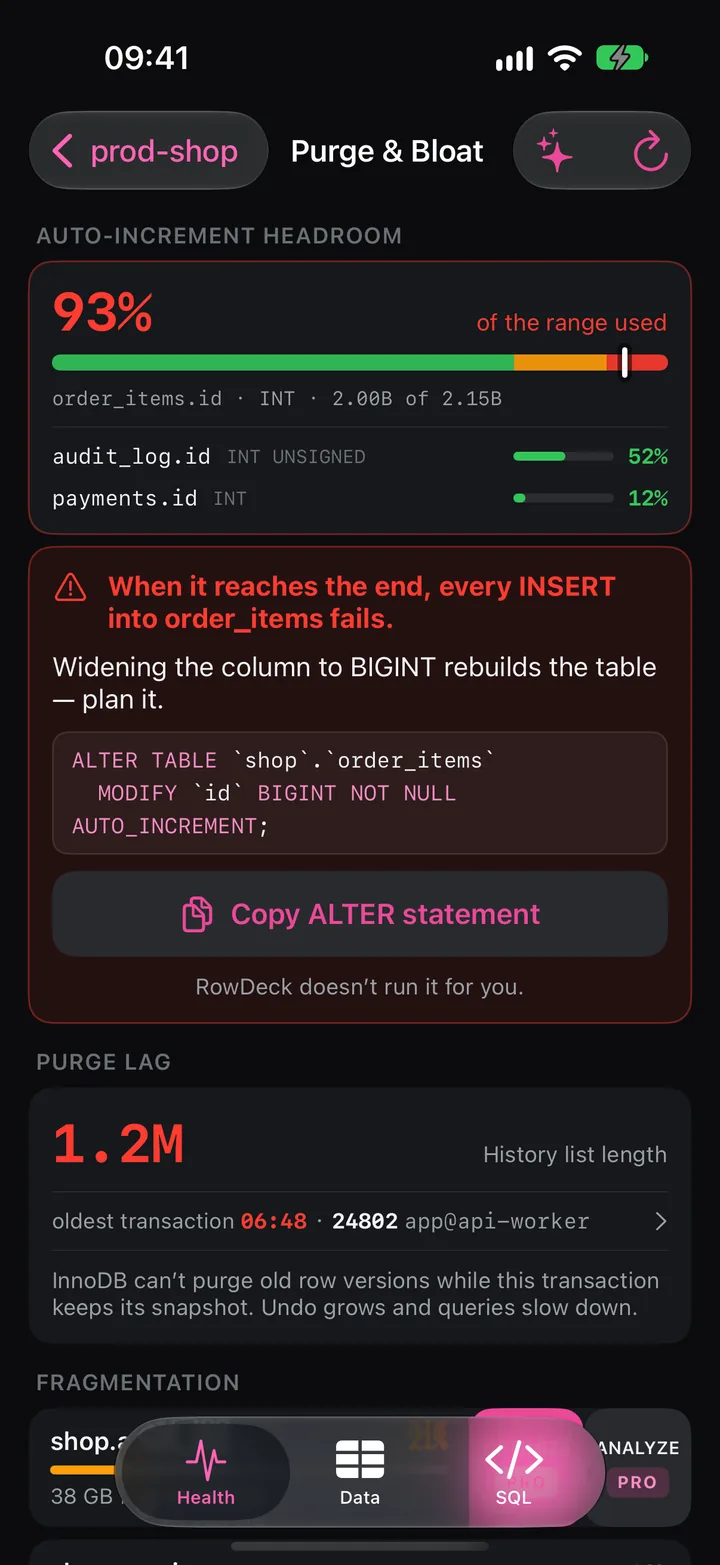
The Purge lag tile on Health turns amber when the history list reaches 100,000 or the oldest transaction has been open for 60 seconds, and red at 1,000,000 or 600 seconds. Tap it to open Purge & Bloat. On MySQL the number comes from trx_rseg_history_len and on MariaDB from Innodb_history_list_length, the same counters as above.
The Purge lag section shows the history list length, 1.2M in the screenshot, and under it the oldest transaction: 06:48 · 24802 app@api-worker. The note reads InnoDB can’t purge old row versions while this transaction keeps its snapshot. Undo grows and queries slow down. Tap the row to open that thread: when its transaction started, its last statement, the locks it holds and the kill button. For a session idle in a transaction RowDeck offers Kill connection and tells you Kill query won’t help: the connection is idle in an open transaction. Thread detail also warns If this is a backup, killing it ends the backup.
If the same session holds row locks that others wait for, Locks shows it as the root blocker. Above the purge lag, the screen tracks auto-increment headroom.
Free and Pro
Health, Purge & Bloat and thread detail are free for one saved connection. Killing the connection needs Pro, a one-time purchase that also adds unlimited connections, writes and the AI assistant. The built-in demo lets you try the kill on sample data before you buy.
Keeping purge moving
- Find where transactions leak. Keep autocommit on for pooled connections, and use a pool that rolls back before it hands a connection out again.
- MariaDB 10.3 and later can close idle transactions with
idle_transaction_timeout,idle_readonly_transaction_timeoutandidle_write_transaction_timeout. MySQL has no equivalent;wait_timeoutcloses idle non-interactive connections after 8 hours by default, open transaction included. - Run
mysqldump --single-transactionand long reports on a replica. A read view there holds back purge on that replica alone. - Alert on the history list length and on the age of the oldest transaction, the two numbers the tile grades.