
Waiting for table metadata lock: fix a hung ALTER TABLE
A migration hangs, and the queries on that table queue up behind it. RowDeck finds the session that holds the metadata lock, counts the queries stuck behind the ALTER and lets you kill whichever one frees the table.
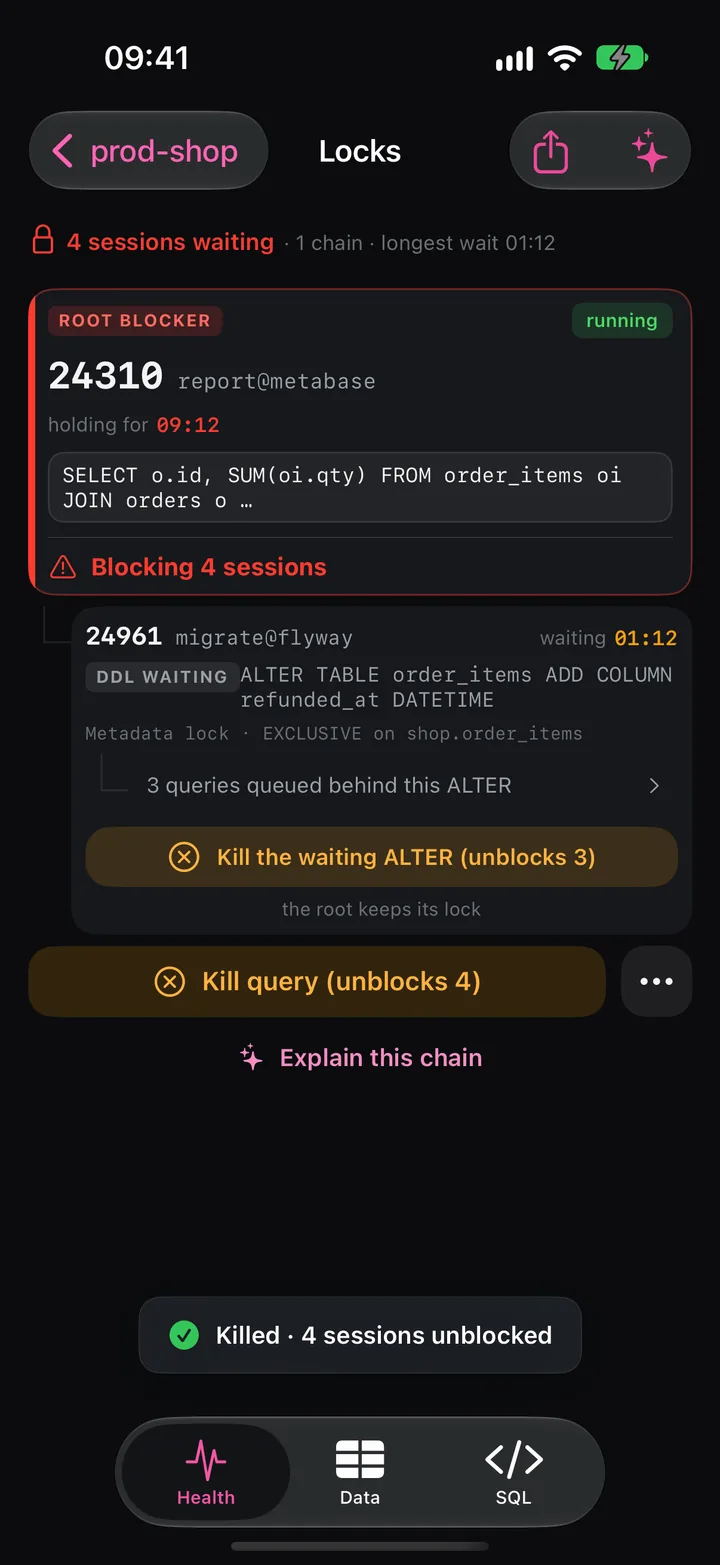
A one-second ALTER that hangs
You deploy a migration that adds a column. With ALGORITHM=INSTANT it should finish in a second. It hangs, and within a minute SHOW PROCESSLIST shows the ALTER and a growing list of SELECT and UPDATE statements, all in the state Waiting for table metadata lock. Checkout starts timing out.
Each statement that touches a table takes a metadata lock (MDL) on it and holds it until its transaction ends. In autocommit, that means until the statement finishes. ALTER TABLE needs an EXCLUSIVE metadata lock, and with INPLACE or INSTANT it still needs one for a moment at the start and at the end. One open transaction that read the table an hour ago is enough to make it wait.
The queue comes from priority. MySQL and MariaDB grant a pending EXCLUSIVE request before new shared ones, so the next SELECT on the table waits behind the ALTER instead of slipping past it. The ALTER waits for the old transaction, and your application waits for the ALTER.
lock_wait_timeout caps that wait, and its defaults are long: 31536000 seconds (one year) on MySQL and 86400 seconds (one day) on MariaDB. Unless you step in, the ALTER outlasts your shift.
Find the holder by hand
MySQL 8.0 records metadata locks in the Performance Schema, with the wait/lock/metadata/sql/mdl instrument on by default:
SELECT t.PROCESSLIST_ID      AS id,
       t.PROCESSLIST_USER    AS user,
       t.PROCESSLIST_COMMAND AS command,
       t.PROCESSLIST_TIME    AS time_s,
       m.LOCK_TYPE, m.LOCK_DURATION, m.LOCK_STATUS
FROM performance_schema.metadata_locks m
JOIN performance_schema.threads t ON t.THREAD_ID = m.OWNER_THREAD_ID
WHERE m.OBJECT_TYPE = 'TABLE'
  AND m.OBJECT_SCHEMA = 'shop' AND m.OBJECT_NAME = 'order_items'
ORDER BY m.LOCK_STATUS, t.PROCESSLIST_TIME DESC;
GRANTED rows hold the table. PENDING rows wait: the ALTER asks for EXCLUSIVE, the queue for SHARED_READ or SHARED_WRITE. The ALTER also holds a granted SHARED_UPGRADABLE, so skip its row. The holder you want has a granted lock with LOCK_DURATION = 'TRANSACTION' on a thread in Sleep or in a long Query.
sys.schema_table_lock_waits pairs waiters with holders:
SELECT object_name, waiting_pid, waiting_lock_type, waiting_query_secs,
       blocking_pid, blocking_lock_type, sql_kill_blocking_connection
FROM sys.schema_table_lock_waits;
The view pairs each waiter with every granted lock on the table, so the waiting ALTER shows up as a blocker of the queued queries. Look for the blocking_pid that belongs to someone else. The instrument records only locks taken after you enable it, so if it was off, turning it on mid-incident won’t reveal the holder.
MariaDB ships with performance_schema off. The metadata_lock_info plugin installs without a restart and lists the locks each connection holds:
INSTALL SONAME 'metadata_lock_info';

SELECT m.THREAD_ID AS id, p.USER, p.COMMAND, p.TIME,
       m.LOCK_MODE, m.LOCK_DURATION
FROM information_schema.METADATA_LOCK_INFO m
JOIN information_schema.PROCESSLIST p ON p.ID = m.THREAD_ID
WHERE m.TABLE_SCHEMA = 'shop' AND m.TABLE_NAME = 'order_items';
With no lock data at all, start from the oldest transactions. INNODB_TRX lists transactions without the tables they touched, so treat each one older than the ALTER as a suspect, oldest first:
SELECT p.ID, p.USER, p.COMMAND, p.TIME, t.trx_started
FROM information_schema.INNODB_TRX t
JOIN information_schema.PROCESSLIST p ON p.ID = t.trx_mysql_thread_id
ORDER BY t.trx_started
LIMIT 5;
Kill the holder or kill the ALTER
You have two exits, and they free different things.
Kill the holder, and the ALTER gets its lock and runs. The queue moves once the ALTER leaves its exclusive phase; with ALGORITHM=COPY, writes keep waiting until the copy ends. A holder asleep in an open transaction needs KILL CONNECTION, which rolls back its work. A holder running a long report needs KILL QUERY.
Kill the waiting ALTER with KILL QUERY, and the queued queries get their locks at once. The holder keeps its lock and its transaction, and the migration fails with an error. Choose this exit if the holder is a backup or a transaction you would rather not roll back, then run the migration again after that holder finishes.
Killing the queued SELECT statements frees nothing, because new ones keep arriving behind the ALTER.
What RowDeck shows
Locks puts metadata locks and row locks into the same tree. The waiting ALTER appears under the session that holds the table, marked DDL WAITING, with Metadata lock · EXCLUSIVE on shop.order_items and a line such as 3 queries queued behind this ALTER. Each exit has its own button: Kill the waiting ALTER (unblocks 3), noted the root keeps its lock, and the root’s own kill, here Kill query (unblocks 4) for a report that has run for 09:12. After either kill, RowDeck reads the tree again and shows what still waits.
The Blocked tile on Health turns red once a queue forms behind a waiting ALTER, however short the queue. In Activity, the ALTER reads waiting: table metadata lock.
If the instrument is off, Locks says The metadata-lock instrument is off on this server. and offers two recipes: Install the plugin · no restart and Or turn it on in the config · restart. The same tree also shows a session that holds the global read lock, as FLUSH TABLES WITH READ LOCK does, and threads stuck in Waiting for table flush.
Free and Pro
The tree, the queue count and the instrument check are free for one saved connection. Both kills, of the waiting ALTER and of the root, need RowDeck Pro, a one-time purchase. The built-in demo has this chain on sample data, and you can run both kills there on Free.
Keep the next migration from hanging
Cap the wait in the migration session and retry on failure:
SET SESSION lock_wait_timeout = 5;
ALTER TABLE order_items ADD COLUMN refunded_at DATETIME, ALGORITHM=INSTANT;
After 5 seconds the ALTER gives up with ERROR 1205 and the queue behind it clears. Your deploy tool can try again a minute later.
- MariaDB 10.3 and later take the limit in the statement:
ALTER TABLE order_items WAIT 5 ADD COLUMN refunded_at DATETIME;, orNOWAITto fail at once. - Before a deploy, look for transactions older than a minute in
INNODB_TRXand find out who owns them. - Keep lock data ready before you need it. On MariaDB, install
metadata_lock_infoahead of time, or start the server withperformance_schema=ONandperformance-schema-instrument='wait/lock/metadata/sql/mdl=ON'.
The lock queue behind an ALTER, step by step replays this incident statement by statement.